






Large-screen tablets are useful in industrial environments only when the larger display improves the workflow, reduces input errors, or makes field data easier to read. For B2B buyers, the best large-screen tablet is not always the biggest available. It is the rugged tablet that fits the operator’s task, mounting position, software platform, connectivity requirements, and maintenance plan.
In consumer markets, big screen tablets are often compared by entertainment value, screen resolution, or brand popularity. The best large-screen tablets are often highlighted in reviews and buying guides, with a focus on top picks for display size and multimedia performance. Tech manufacturers often reserve their best display technology, such as OLED display, for their flagship large-screen models. Larger high-resolution displays provide a more theater-like experience for streaming movies and playing games. In industrial use, the buying logic is different. A large screen rugged tablet may need to survive dust, rain, vibration, drops, forklift movement, vehicle power fluctuation, glove operation, barcode scanning, RFID checks, GNSS positioning, or Windows-based industrial software.
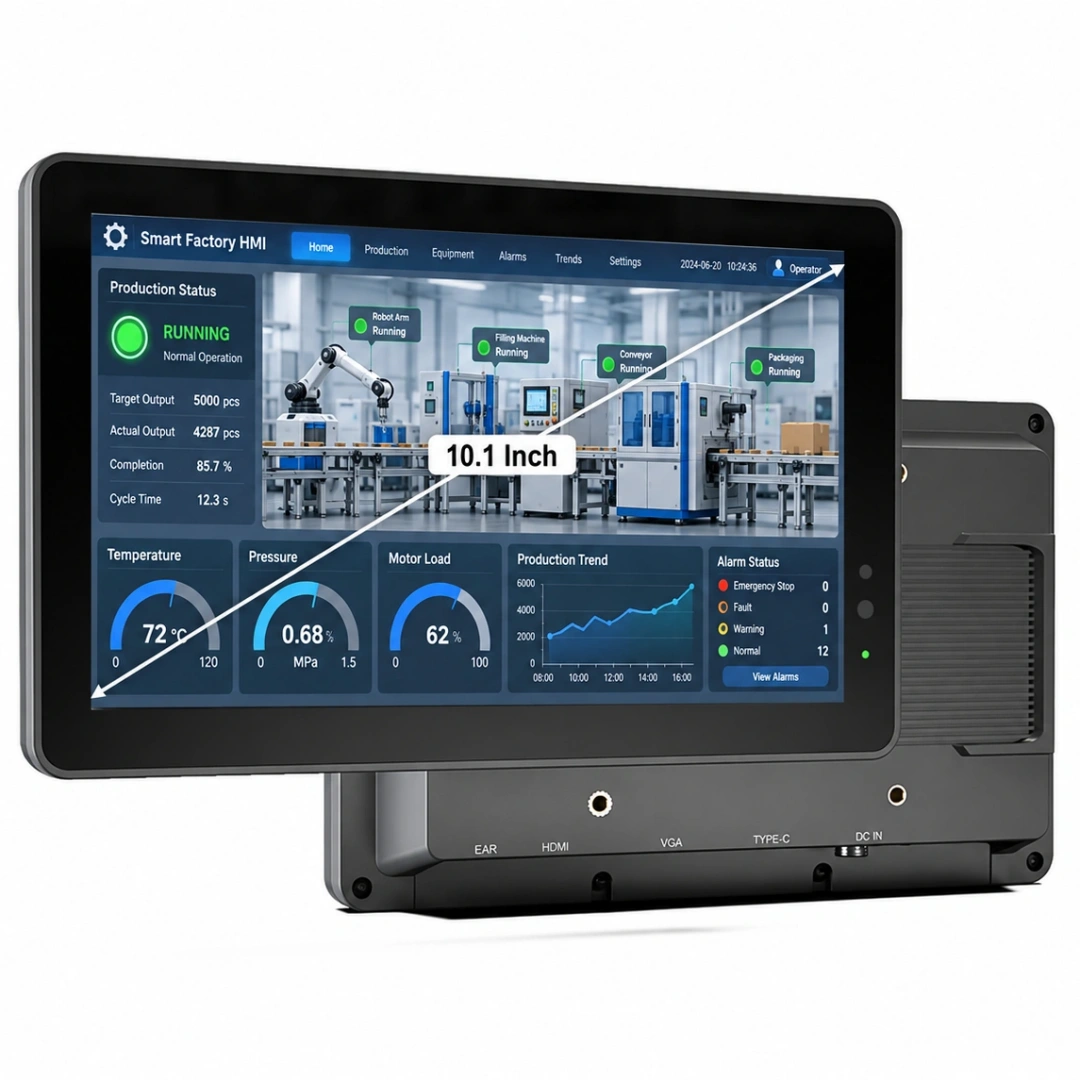
That is why a large tablet computer for a factory, warehouse, vehicle, utility crew, or field service team should be selected by workflow first and screen size second. A 10.1-inch rugged Android tablet may be the right fit for barcode scanning and mobile work orders. A 12-inch or 14-inch Windows rugged tablet may be better for MES, ERP, HMI, diagnostics, inspection forms, and engineering drawings. A 15.6-inch or larger display may belong more naturally to an industrial panel PC or fixed workstation than to a handheld tablet.
This guide explains how to choose large-screen tablets for industrial use, including Android, Windows, rugged tablet sizes, deployment risks, and the practical trade-offs that matter in B2B procurement.
What Makes Large Screen Tablets Different in Industrial Workflows?
A large-screen tablet becomes valuable when workers need to see more data, compare more fields, or interact with software that was not designed for a small handheld screen. In industrial workflows, screen size is not a cosmetic feature. It affects visibility, input accuracy, operator fatigue, mounting design, battery demand, and the number of steps required to complete a task.
For example, a warehouse worker using a simple scan-and-confirm app may not need a large tablet screen. A rugged handheld or compact Android tablet may be faster and lighter. But a forklift operator viewing a WMS task list, location map, SKU details, pallet status, and exception messages may benefit from a larger display mounted in the vehicle.
The same logic applies in manufacturing. A machine-side operator entering production data into MES software may need a bigger screen to view work orders, quality checkpoints, drawings, and shift notes. A field technician working with service forms, photos, diagnostic data, and GPS location may also benefit from a tablet with a large screen.
A large-screen rugged tablet is most valuable when it reduces scrolling, prevents misreading, supports multi-field forms, and keeps critical information visible during work.
When a Large Tablet Screen Size Actually Improves Productivity

A larger screen does not automatically improve productivity. It improves productivity only when the task requires more visual space than a compact device can comfortably provide.
In warehouse operations, a large screen tablet can help with receiving, picking, packing, inventory count, forklift dispatch, and exception handling. Operators can see order details, bin locations, product photos, scan results, and WMS instructions without constantly switching screens.
In manufacturing, large tablets help operators view MES work orders, inspection checklists, process parameters, and quality notes at the machine side. The advantage is not just readability. There are fewer input mistakes and faster confirmation during repetitive workflows.
In transportation and field service, big screen tablets can display maps, route updates, proof-of-delivery forms, vehicle diagnostics, customer notes, and image attachments. When mounted properly, a larger screen can improve situational awareness without forcing the operator to zoom or scroll while working.
In agriculture, surveying, energy, and utilities, a tablet with a large screen can make GIS maps, GNSS positioning data, asset records, and field forms easier to use outdoors. However, outdoor usability also depends on brightness, anti-glare design, touch mode, battery life, and weather protection.
| Workflow | Why a Large Screen Helps | Better Device Direction |
|---|---|---|
| Warehouse forklift operation | Shows WMS tasks, bin locations, SKU data, and scan results together | Vehicle-mounted rugged tablet |
| Manufacturing work orders | Reduces scrolling in MES forms and quality checklists | Rugged Windows tablet or Android rugged tablet |
| Field service | Displays forms, photos, maps, and asset history | Rugged tablet with GPS/GNSS |
| Logistics dispatch | Improves route, delivery, and vehicle status visibility | Vehicle-mounted rugged tablet |
| Inspection and maintenance | Supports checklist, image capture, and notes | Rugged Android or Windows tablet |
| GIS, agriculture, surveying | Improves map and location data viewing | GNSS / RTK rugged tablet |
| Fixed factory workstation | Large display for dashboards and HMI | Industrial panel PC |
Screen Size Selection: 8-Inch, 10.1-Inch, 12-Inch, 14-Inch, or Larger?

The right large tablet screen size depends on how the device is held, mounted, charged, and used during the shift. The larger the screen, the more important the mounting method, battery plan, and operator posture become.
For many industrial mobile workflows, 10.1 inches is the practical middle ground. It is large enough for forms, maps, WMS screens, and inspection checklists, but still manageable as a mobile rugged tablet. This is why many rugged Android tablets and rugged Windows tablets use 10-inch class displays.
An 8-inch rugged tablet is better when mobility matters more than screen area. It fits handheld inspection, patrol, basic data collection, and compact vehicle cabins. It is easier to carry, but less comfortable for complex forms or dense software screens.
A 12-inch or 14-inch rugged tablet is more suitable when the user needs a large Windows workspace, detailed industrial software, or a vehicle/fixed mount. This size range is useful for MES, ERP, diagnostics, HMI, and engineering-oriented tasks. However, it is less convenient for long handheld shifts.
A 15.6-inch or larger device often crosses into industrial panel PC territory. It can be useful for fixed production stations, kiosks, HMI panels, and dashboards, but it is usually not ideal for mobile tablet work.
| Screen Size | Best Fit | Not Ideal For | Buyer’s Note |
|---|---|---|---|
| 7–8 inch | Handheld inspection, patrol, compact data entry | Large maps, complex forms, Windows software | Choose when portability is more important than display space |
| 10.1 inch | Warehouse, field service, vehicle use, Android data collection | Very tight handheld work | Best balance for many rugged tablet deployments |
| 12 inch | Windows software, service diagnostics, and inspection forms | Lightweight handheld scanning | Good for mounted or semi-mobile use |
| 14 inch | Large Windows workspace, MES, ERP, HMI, field engineering | Frequent one-handed operation | Needs stronger mounting and battery planning |
| 15.6 inch+ | Fixed workstation, factory dashboard, kiosk, HMI | Mobile tablet use | Consider an industrial panel PC instead |
A practical rule is simple: choose 10.1 inches when the device must remain mobile, choose 12 to 14 inches when the workflow needs a larger Windows or mounted workspace, and choose an industrial panel PC when the screen is mostly fixed.
Large Android Tablets for Barcode, RFID, NFC, and Mobile Data Collection
Large Android tablets are a strong fit for mobile industrial data collection when workers need a simple interface, fast app access, wireless connectivity, and optional data capture modules. An Android big-screen tablet can work well in warehouse receiving, inventory count, field inspection, retail stock checks, logistics proof of delivery, and asset tracking.
The key advantage of Android is deployment simplicity. Many warehouse, logistics, inspection, and field service apps are already optimized for Android. Workers can scan a barcode, capture a photo, confirm a task, sync data through Wi-Fi or 4G/5G, and move to the next job without managing a full desktop operating system.
For industrial buyers, the important question is not whether the tablet runs Android. The question is whether the Android rugged tablet can support the required data capture method. That may include 1D/2D barcode scanning, NFC checks, UHF RFID reading, GPS/GNSS positioning, camera documentation, Bluetooth peripherals, or docking station expansion.
A large-screen Android tablet is especially useful when barcode scanning is only one part of the workflow. If the operator also needs to view item photos, quantity fields, location instructions, customer notes, or route details, a larger screen can reduce errors. If the worker only scans small items continuously, a rugged handheld may be more efficient.
KCOSIT product bridge: for Android-based inventory, inspection, logistics, and mobile data collection projects, buyers should evaluate rugged Android tablets with optional barcode, NFC, UHF RFID, GNSS, long battery life, and docking accessories. For scanning-heavy workflows, rugged handhelds or UHF RFID devices may be a better fit than a large tablet.
Big Screen Windows Tablets for MES, ERP, HMI, and Industrial Software

A big-screen Windows tablet is usually selected for a different reason than an Android rugged tablet. Windows matters when the organization needs to run existing desktop software, browser-based enterprise systems, industrial applications, drivers, device utilities, or Windows-only tools.
Manufacturing buyers often choose Windows rugged tablets for MES, ERP, SCADA-related access, HMI support, machine-side reporting, quality inspection software, maintenance records, and engineering files. The larger screen is useful because many Windows applications were designed for laptops or desktop monitors, not small handheld devices.
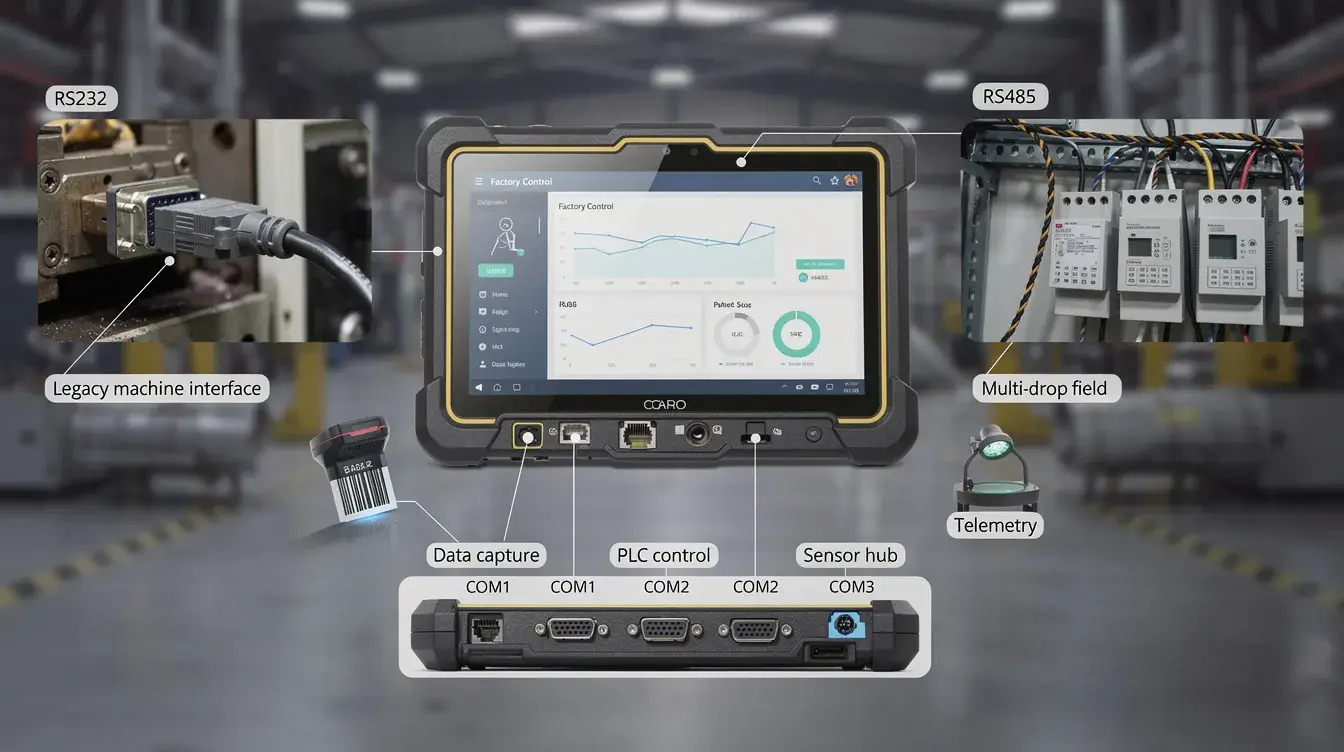
A Windows tablet with a large screen can reduce the friction of using dense forms, tables, tabs, and pop-up windows. It can also make it easier to connect to LAN networks, USB devices, serial equipment, barcode scanners, label printers, docking stations, and industrial peripherals.
However, Windows rugged tablets require more planning. Buyers should check CPU performance, RAM, storage, Windows version, driver support, security policy, software compatibility, docking station requirements, and IT management workflow. A large screen tablet PC can be powerful, but it may also be heavier, more expensive, and more complex to deploy.
KCOSIT product bridge: for MES, ERP, HMI, diagnostics, quality inspection, and Windows industrial software, rugged Windows tablets with docking stations, LAN, USB, RS232/RS485, and mounting options should be evaluated before consumer Windows tablets or detachable laptops.
Large Tablet Computer vs Rugged Tablet: Why Consumer Tablets Are Not Enough
A consumer’s large tablet computer may look attractive because it is thin, bright, and familiar. But in industrial procurement, a consumer tablet often fails because it is not designed for the full working environment.
The difference is not only the outer shell. A rugged tablet is designed around environmental exposure, operational continuity, peripheral integration, serviceability, and deployment control. It may include IP-rated sealing, drop-resistant housing, reinforced corners, glove/wet touch support, sunlight-readable display options, replaceable or high-capacity batteries, docking contacts, vehicle mounts, and industrial I/O.
IP ratings are based on IEC 60529, which defines degrees of protection provided by enclosures against dust and water ingress. For industrial buyers, this matters because “water resistant” is not the same as a tested IP rating.
MIL-STD-810H is commonly referenced for environmental engineering considerations and laboratory tests, but buyers should still verify which methods were tested and under what conditions. A vague “military-grade” claim is not enough for a procurement decision.
| Comparison Point | Consumer Large Tablet | Rugged Large Screen Tablet |
|---|---|---|
| Drop resistance | Usually limited | Designed for field drops, shock, and vibration |
| Dust and water exposure | Often limited or unclear | IP-rated protection can be specified |
| Touch operation | Usually bare-finger use | May support glove, wet touch, or stylus |
| Mounting | Consumer cases and stands | VESA, vehicle dock, forklift mount, desktop dock |
| Ports and expansion | Minimal ports | USB, LAN, serial, docking, scanner, and RFID options |
| Battery strategy | Built-in consumer battery | Long battery, replaceable battery, or dock charging options |
| Lifecycle | Frequent consumer refresh cycles | Better for standardization and fleet deployment |
| Support burden | Harder to standardize across sites | Easier to configure, mount, replace, and maintain |
The best reason to choose a rugged tablet is not that it sounds stronger. It is that it reduces failure points in the real workflow.
Spec-to-Risk Matrix: How Hardware Choices Affect Field Reliability
Industrial tablet specifications should always be translated into field consequences. A buyer should not read a spec sheet as a list of features. Each specification should answer one question: what risk does this reduce during operation?
| Hardware Factor | What to Check | Field Risk If Ignored |
|---|---|---|
| IP rating | Dust and water protection level | Device failure in rain, washdown, dust, or outdoor work |
| Drop resistance | Drop height, test method, and corner protection | Screen or housing damage after everyday accidents |
| Display brightness | Nits, anti-glare, outdoor readability | Screen unreadable in sunlight or vehicle cabins |
| Touch mode | Glove touch, wet touch, stylus support | Operators remove gloves or make input errors |
| Battery life | Shift length, hot-swap, replaceable battery | Downtime before the shift ends |
| OS platform | Android or Windows software compatibility | The app or driver cannot run properly |
| CPU/RAM/storage | Software workload and multitasking | Slow response in MES, maps, or inspection apps |
| Data capture | Barcode, NFC, UHF RFID, camera, GNSS | External devices increase complexity |
| Connectivity | Wi-Fi, 4G/5G, Bluetooth, GPS/GNSS | Poor data sync or location tracking |
| I/O ports | USB, LAN, RS232, RS485, CANbus options | Cannot connect printers, PLC gateways, vehicle data, or peripherals |
| Mounting | VESA, vehicle dock, forklift mount | Vibration, poor ergonomics, unsafe installation |
| Charging | Docking station, vehicle power, spare batteries | Charging bottlenecks and device rotation problems |
| Lifecycle | Availability, accessories, service plan | Difficult replacement across multiple sites |
A large screen rugged tablet is a system decision. The tablet, dock, mount, charging method, accessories, software, and support process must work together.
Myth vs Reality: Bigger Screen, Waterproof Claims, and Rugged Tablet Assumptions
Myth 1: The biggest tablet screen is always the best choice.
Reality: the biggest screen is only useful when the workflow needs it. A 14-inch rugged tablet may be excellent for Windows software, vehicle mounting, or inspection dashboards, but it may be too heavy for all-day handheld scanning. For many mobile teams, 10.1 inches is a better operational balance.
Myth 2: A consumer tablet with a rugged case is the same as a rugged tablet.
Reality: a case may reduce cosmetic damage, but it does not automatically provide industrial-grade sealing, docking, barcode integration, replaceable battery strategy, wide operating temperature, serial I/O, or lifecycle control. Ruggedness is not only about impact protection; it is about the whole deployment environment.
Myth 3: Waterproof means the device can survive any wet condition.
Reality: waterproof language is often vague. Buyers should check the exact IP rating, test conditions, port protection, connector sealing, and whether the tablet is expected to survive rain, water jets, temporary immersion, washdown, or outdoor mud. An IP67 device and an IP65 device are not the same use case.
Myth 4: External accessories are always cheaper than built-in modules.
Reality: external barcode scanners, Ethernet adapters, USB hubs, and card readers may be cheaper at first, but they add cables, charging points, pairing issues, driver risks, and replacement complexity. In a controlled office, that may be acceptable. In a warehouse, vehicle, or field team, built-in or dock-integrated modules often reduce support burden.
Vehicle, Forklift, and Fixed-Mount Deployment Considerations
Large screen tablets are often used in vehicles, forklifts, carts, service vans, and fixed workstations. In these deployments, the screen size decision must include mounting, vibration, power input, cable routing, and operator safety.
For forklift mounting, the tablet should not block visibility or interfere with controls. A 10.1-inch rugged tablet is often easier to place than a larger unit, but a larger Windows tablet may be justified if the operator needs full WMS, ERP, or yard management screens. The mount must handle vibration, impact, and repeated adjustment.
For fleet and vehicle use, buyers should check whether the tablet needs GNSS, LTE/5G, Bluetooth, Wi-Fi, CANbus, RS232, camera input, or wide voltage power through a docking station. Vehicle power is not always stable, so the installation design matters as much as the tablet itself.
For factory workstations, a large screen tablet may be mounted near a machine, inspection bench, or packing station. In this case, LAN, USB, serial ports, barcode scanner integration, label printer connectivity, and charging contacts may be more important than handheld comfort.
For fixed dashboards, HMI, and production display tasks, an industrial panel PC may be better than a tablet. A panel PC offers a more permanent installation, larger screen options, and stable power integration. A rugged tablet is better when the device must move between stations or be removed for mobile work.
KCOSIT product bridge: for forklift, fleet, and vehicle workflows, buyers should consider vehicle-mounted rugged tablets, wide-voltage docking solutions, GNSS options, CANbus/serial integration, and VESA or vehicle mounting accessories. For fixed HMI or dashboard use, industrial panel PCs may be the more stable category.
Who Should Not Choose a Large Screen Rugged Tablet?

A large-screen rugged tablet is not the right choice for every industrial workflow. In some cases, a smaller rugged handheld, compact tablet, or fixed panel PC is a better procurement decision.
You should not choose a large-screen rugged tablet if the worker only performs rapid barcode scanning with minimal on-screen interaction. A rugged handheld with an integrated scanner may be faster, lighter, and easier to carry.
You should also avoid oversized tablets for pocket-based inspection routes, long one-handed operation, or workflows where workers climb ladders, crawl into equipment areas, or constantly switch between carrying tools and using the device.
A large screen tablet may not be ideal for narrow vehicle cabins if it blocks visibility or creates unsafe mounting angles. In this case, a compact vehicle terminal or a smaller rugged tablet may be safer.
A big-screen Windows tablet may also be unnecessary if the software is a simple Android app or browser-based form. Windows adds value when the workflow requires Windows software, drivers, peripherals, or enterprise IT compatibility. It should not be selected just because it appears more powerful.
Wrong-fit summary:
- Choose a rugged handheld for scan-heavy warehouse work.
- Choose an 8-inch rugged tablet for compact mobile inspection.
- Choose a 10.1-inch rugged tablet for balanced field and warehouse workflows.
- Choose a 12-inch or 14-inch Windows rugged tablet for industrial software and mounted workflows.
- Choose an industrial panel PC for fixed HMI, kiosk, dashboard, or workstation use.
Procurement Checklist for Large Screen Rugged Tablets
Before approving a large-screen tablet project, procurement teams should verify the device against the real workflow, not just the brochure.
Use this checklist during supplier evaluation, pilot testing, or internal requirement building.
- Define the primary workflow: scanning, inspection, dispatch, MES, ERP, HMI, mapping, or field service.
- Confirm whether Android or Windows is required by the software.
- Test the screen size with real forms, maps, dashboards, or WMS/MES pages.
- Check outdoor readability, brightness, viewing angle, and anti-glare performance.
- Validate glove touch, wet touch, stylus use, or bare-finger operation.
- Match the IP rating to dust, rain, splash, immersion, washdown, or outdoor exposure.
- Ask which MIL-STD-810H methods were tested, not just whether the term is used.
- Confirm drop resistance and corner protection for the expected work environment.
- Test barcode, NFC, UHF RFID, camera, GPS/GNSS, or RTK modules if required.
- Verify Wi-Fi, Bluetooth, 4G/5G, and GPS/GNSS performance in the actual site.
- Check LAN, USB, RS232, RS485, CANbus, or other I/O requirements.
- Review docking station, desktop dock, vehicle dock, and charging workflows.
- Confirm VESA, forklift, vehicle, or wall-mount compatibility.
- Calculate battery needs by shift length, not by marketing battery claims.
- Plan spare batteries, chargers, docks, cables, and mounting accessories.
- Verify software update policy, device management, and security requirements.
- Confirm lifecycle availability for multi-site standardization.
- Test the replacement and repair process before large-scale rollout.
- Run a pilot with real operators before final purchase.
A successful rugged tablet deployment usually fails or succeeds before the purchase order is placed. The pilot phase reveals whether the selected large-screen tablet actually fits the workflow.
Final Recommendation: Choose by Workflow, Not by Screen Size Alone
Large-screen tablets are worth buying when they make industrial work easier to read, faster to complete, and more reliable to verify. They are not worth buying just because the screen is bigger.
For Android data collection, choose a large Android rugged tablet when workers need barcode scanning, NFC, RFID, GPS/GNSS, photos, forms, and wireless sync in one mobile device. For scan-heavy work, evaluate rugged handhelds as well.
For Windows industrial software, choose a big-screen Windows rugged tablet when the workflow depends on MES, ERP, HMI, diagnostics, inspection software, LAN, USB, serial devices, or Windows-only applications.
For vehicle and forklift deployment, prioritize mounting, power stability, docking, GNSS, connectivity, and safe screen placement. A large screen is useful only when it can be installed without creating visibility or vibration problems.
For fixed workstations, dashboards, and machine-side HMI, compare a rugged tablet against an industrial panel PC. The tablet is better for mobility. The panel PC is better for permanent installation.
The best large-screen rugged tablet is the one that fits the workflow, survives the environment, connects to the required systems, and can be supported across the full deployment lifecycle.
FAQ
What are large-screen tablets?
Large screen tablets are tablets with displays large enough for more comfortable reading, data entry, multitasking, or software operation. In industrial use, this often means 10.1-inch, 12-inch, 14-inch, or larger rugged tablets, depending on the workflow.
What is the best large tablet screen size for industrial use?
For many industrial mobile workflows, 10.1 inches is the best balance between visibility and portability. For Windows software, vehicle mounting, HMI access, and complex forms, 12-inch or 14-inch rugged tablets may be more suitable.
Are large Android tablets good for warehouse work?
Large Android tablets are suitable for warehouse work when operators need barcode scanning, WMS task visibility, inventory forms, item photos, NFC, RFID, or mobile data collection. For continuous scan-only workflows, a rugged handheld may be faster and lighter.
When should I choose a big-screen Windows tablet?
Choose a big-screen Windows tablet when your workflow depends on Windows software, MES, ERP, HMI tools, quality inspection systems, industrial drivers, LAN, USB, serial ports, or docking station connectivity.
Is a consumer tablet with a large screen enough for industrial use?
A consumer tablet may be enough for office use, but it is usually not enough for harsh industrial environments. Rugged tablets are better for dust, water, drops, vibration, glove touch, mounting, docking, data capture, and long-term deployment control.
Are bigger tablets harder to deploy?
Yes, larger tablets can be harder to deploy if the project does not plan for weight, mounting, power, battery life, charging, vehicle placement, and operator ergonomics. Bigger screens need stronger deployment planning.
What is the difference between a large screen rugged tablet and an industrial panel PC?
A large screen rugged tablet is better when the device must move with the worker or vehicle. An industrial panel PC is better for fixed HMI, dashboards, kiosks, and machine-side installations that require permanent mounting and stable power.