







Rugged Windows 10 tablets are still relevant in industrial projects when legacy software, Windows-only drivers, serial peripherals, fixed enterprise images, or older MES, WMS, ERP, HMI, and inspection applications require a Windows environment. These devices are specifically designed for extreme environments and harsh conditions, making them ideal for demanding fieldwork and industrial use. However, they should not be purchased like ordinary tablets in 2026. The operating system lifecycle, hardware support, docking compatibility, I/O design, and future migration path matter as much as IP rating or drop resistance.
For many buyers, the real question is not “Can I still find rugged Windows 10 tablets for sale?” The better question is: “Should my project standardize on Windows 10, Windows 10 IoT Enterprise LTSC, Windows 11, or a rugged Android tablet instead?” When evaluating options, it is important to consider rugged certifications such as MIL-STD-810H and IP ratings as key specs and features, since these indicate the device’s ability to withstand dust, water, and physical impacts.
A Windows rugged tablet can be the right choice for factory workstations, field service diagnostics, warehouse PCs, vehicle terminals, quality inspection, and industrial software deployment. But if the project only needs barcode scanning, mobile forms, proof of delivery, or cloud-based Android apps, a rugged Android tablet for fieldwork and industrial use, or a rugged handheld may be easier to deploy and maintain.
This guide explains how to evaluate rugged Windows 10 tablets from a B2B industrial procurement perspective, not as consumer electronics or casual outdoor gear. Many rugged tablets meet or exceed military standards like MIL-STD-810H and feature IP ratings, ensuring durability and reliability in harsh environments and fieldwork.
Rugged Windows 10 Tablets: The Purchase Decision in One Sentence
A rugged Windows 10 tablet is worth considering only when your workflow depends on Windows software, Windows drivers, enterprise device images, legacy industrial peripherals, or fixed Windows-based operating procedures.
If your team is simply looking for the best outdoor tablet for rain, dust, sunlight, and drops, the operating system should not be the starting point. The workflow should be the starting point. A rugged Windows tablet makes sense when the software stack is Windows-based. A rugged Android tablet often makes more sense when the task is mobile data capture, barcode scanning, RFID checks, delivery confirmation, or app-based field reporting, especially for field work where durability and reliability are critical.
This distinction is important because Windows tablets usually carry more deployment overhead than Android devices. They may require patch management, driver validation, endpoint security tools, larger batteries, stronger processors, and more careful IT support. In return, they offer stronger compatibility with desktop-class industrial software and traditional enterprise environments. When choosing a rugged tablet, key factors such as durability ratings, performance specifications, and environmental certifications should be carefully evaluated to ensure the device meets the demands of your application.
For industrial buyers, the correct decision is rarely “Windows is better” or “Android is better.” The correct decision is: match the operating system to the workflow, peripheral requirements, and support model.
Why Industrial Teams Still Search for Windows 10 Rugged Tablets
Many industrial teams still search for rugged Windows 10 tablets because their work environments are not upgraded at the same speed as consumer technology. A production line, warehouse management system, vehicle diagnostic platform, inspection application, or factory-side ERP terminal may remain stable for years after a consumer operating system has moved on.
There are several common reasons buyers still look for an industrial tablet with a Windows 10 configuration.
First, legacy software compatibility is a major driver. Some industrial applications were built, tested, and validated on Windows 10. Replacing the operating system may require retesting the entire workflow, including printers, barcode scanners, PLC gateways, USB tools, LAN devices, and security software.
Second, Windows driver support can be critical. In manufacturing, field service, utilities, and vehicle diagnostics, the tablet may need to connect to old USB devices, serial adapters, measurement tools, label printers, or specialized diagnostic equipment. These peripherals may not have reliable Android support.
Third, enterprise IT teams often maintain standard Windows images. If a company has already built a Windows 10 image with security policies, VPN settings, remote management tools, and approved software, replacing it with Windows 11 or Android may require internal approval.
Fourth, operators are already trained on Windows workflows. In some factories and inspection environments, technicians use desktop-style interfaces, file folders, spreadsheets, Windows applications, and browser-based systems configured for Windows.
Finally, some buyers are replacing an existing fleet. If a company has 80 Windows 10 rugged tablets already installed across warehouses or field teams, it may want compatible replacement units instead of introducing a new operating system mid-cycle. Frequent travelers and teams needing highly portable devices may also prefer rugged Windows 10 tablets for their durability and ease of transport, making them ideal for on-the-go use between sites or in the field.
These are valid reasons. But they do not remove the need to verify Windows lifecycle, security policy, hardware availability, and migration planning.
Windows 10, Windows 10 IoT Enterprise, and Windows 11: Do Not Treat Them the Same

One of the biggest procurement mistakes is treating every “Windows 10 rugged tablet” as the same type of device. In industrial purchasing, Windows 10 Home, Windows 10 Pro, Windows 10 Enterprise, Windows 10 IoT Enterprise, and Windows 10 IoT Enterprise LTSC can have very different lifecycle and deployment implications.
For new industrial deployments, this difference matters more than the label on the product page.
| OS Option | Typical Use | Procurement Risk | Best-Fit Scenario |
|---|---|---|---|
| Windows 10 Pro | General business tablet use | Mainstream support has ended; security planning is required | Short-term replacement for the existing fleet only |
| Windows 10 Enterprise | Managed enterprise environment | Requires IT lifecycle control | Companies with established Windows 10 management policies |
| Windows 10 IoT Enterprise | Dedicated industrial or embedded devices | Must verify exact edition and lifecycle | Fixed-purpose industrial tablets, terminals, and equipment |
| Windows 10 IoT Enterprise LTSC | Long-term special-purpose devices | Better lifecycle, but needs correct licensing and supplier support | Factory terminals, vehicle computers, dedicated industrial systems |
| Windows 11 Pro / IoT Enterprise | Modern Windows deployment | Software and driver compatibility must be tested | New projects with updated industrial applications |
The key judgment is simple: do not buy a rugged Windows 10 tablet only because the price looks attractive. Confirm the exact Windows edition, activation method, support lifecycle, driver package, update policy, and whether your software vendor still supports that OS.
If your project requires a new long-term deployment, Windows 11 or Windows IoT Enterprise may be safer. If your project is a controlled replacement for a legacy system, rugged Windows tablets for industrial use may still be reasonable when the risks are documented and accepted.
Where Rugged Windows Tablets Fit in Industrial Workflows
A rugged Windows tablet is strongest when it acts like a portable industrial PC rather than a consumer tablet. It should support real software, real peripherals, and real field conditions.
In manufacturing, rugged Windows tablets are often used for MES access, work order tracking, quality inspection, machine-side reporting, maintenance logs, and production data entry. Workers may use the tablet beside a machine, inside a workshop, or on a mobile cart. In this environment, LAN connectivity, USB ports, glove touch, dock charging, detachable keyboard, USB-C connectivity, and a responsive touch screen are important features for usability and connectivity, while long-term image control may be more important than thin design.
In warehouses, a Windows rugged tablet can support WMS dashboards, forklift-mounted data entry, inventory checking, label printing, receiving workflows, and packing station verification. Detachable keyboard, USB-C, and touch screen features enhance workflow flexibility and connectivity. However, if the main task is fast barcode scanning during picking or cycle counting, rugged tablets for warehouse management or a barcode scanner tablet may be more efficient.
In field service, Windows rugged tablets are useful when technicians need diagnostic software, service manuals, VPN access, CAD drawings, forms, and device configuration tools. The tablet may be used outdoors, inside vehicles, at customer sites, or in utility environments. Key features for field work include a stylus pen for precise input, hot swappable batteries for uninterrupted use, compact design for portability, long battery life for all-day operation, and a display that remains readable in direct sunlight. Display brightness, battery life, cellular connectivity, and docking become critical. Fieldwork tablets should support network options like 4G LTE or 5G for real-time data synchronization in remote areas.
In transportation and vehicle applications, rugged Windows tablets may be mounted in trucks, forklifts, service vehicles, or special equipment. For these demanding applications, vehicle-mounted tablets for fleet management with robust specs, powered by modern Intel Core or AMD Ryzen processors, are essential for high computing power and reliability. Features such as a rear camera for documentation, dedicated GPS with an integrated L1/L5 receiver for precise location tracking, and advanced connectivity are crucial. Vehicle power, vibration resistance, docking locks, external antennas, ignition control, and wide-voltage input become more important than simple handheld mobility.
In utilities, energy, construction, and public service, Windows rugged tablets may support GIS maps, inspection reports, asset records, work orders, and photo documentation. Here, a fully rugged tablet with advanced features, high computing power, and reliable specs is necessary. Devices powered by Intel Core i5 or i7, or AMD Ryzen processors, are required for demanding applications. Integrated GPS with L1/L5 receiver ensures higher accuracy than standard consumer-grade GPS. Outdoor readability is enhanced by high-brightness displays (over 700 nits) with anti-reflective treatment, and true sunlight readability requires at least 800–1000 nits of brightness and anti-glare technology. GNSS, wet-touch support, and drop resistance become daily productivity factors.
A rugged Windows tablet should be selected by workflow location: handheld, mounted, docked, vehicle-based, or workstation-style. The same device rarely performs equally well in every role.
Spec-to-Risk Matrix for Rugged Windows 10 Tablets

A specification is only useful when it explains a field consequence. Industrial buyers should translate every hardware feature into deployment risk.
| Specification | What It Means | Field Risk If Underspecified | Buyer Verification |
|---|---|---|---|
| IP Ratings (IP65 / IP67 / IP68), water resistant, dust resistant | Ingress protection against dust and water; water-resistant and dust-resistant capabilities certified by IP ratings | Failure in rain, washdown, dusty warehouse, or outdoor jobsite | Confirm IP rating, rugged certifications, and port sealing design |
| MIL-STD-810H rugged certifications | Shock, vibration, temperature, and drop test reference; certified ruggedness for harsh environments | Damage from drops, forklift vibration, vehicle use, or rough handling | Ask for MIL-STD-810H rugged certifications, test scope, drop height, and operating limits |
| Sunlight-readable display | Higher brightness and better outdoor visibility | Operators cannot read maps, forms, or inspection screens outdoors | Test under real sunlight, not only indoor brightness |
| Glove / wet touch | Touchscreen works with gloves or moisture | Workers remove gloves or experience input errors | Test with actual gloves used on site |
| Battery capacity | Runtime under workload | The device cannot cover a shift | Test with Wi-Fi, LTE, brightness, and active software |
| Replaceable battery | The battery can be swapped during shifts | Downtime during charging | Verify hot-swap or warm-swap behavior |
| CPU / RAM / SSD | Windows application performance | Slow boot, lag, and application crashes | Test with the actual software image |
| LAN / RJ45 | Stable wired network | Wi-Fi congestion, unstable factory connection | Check the built-in port or the docking LAN |
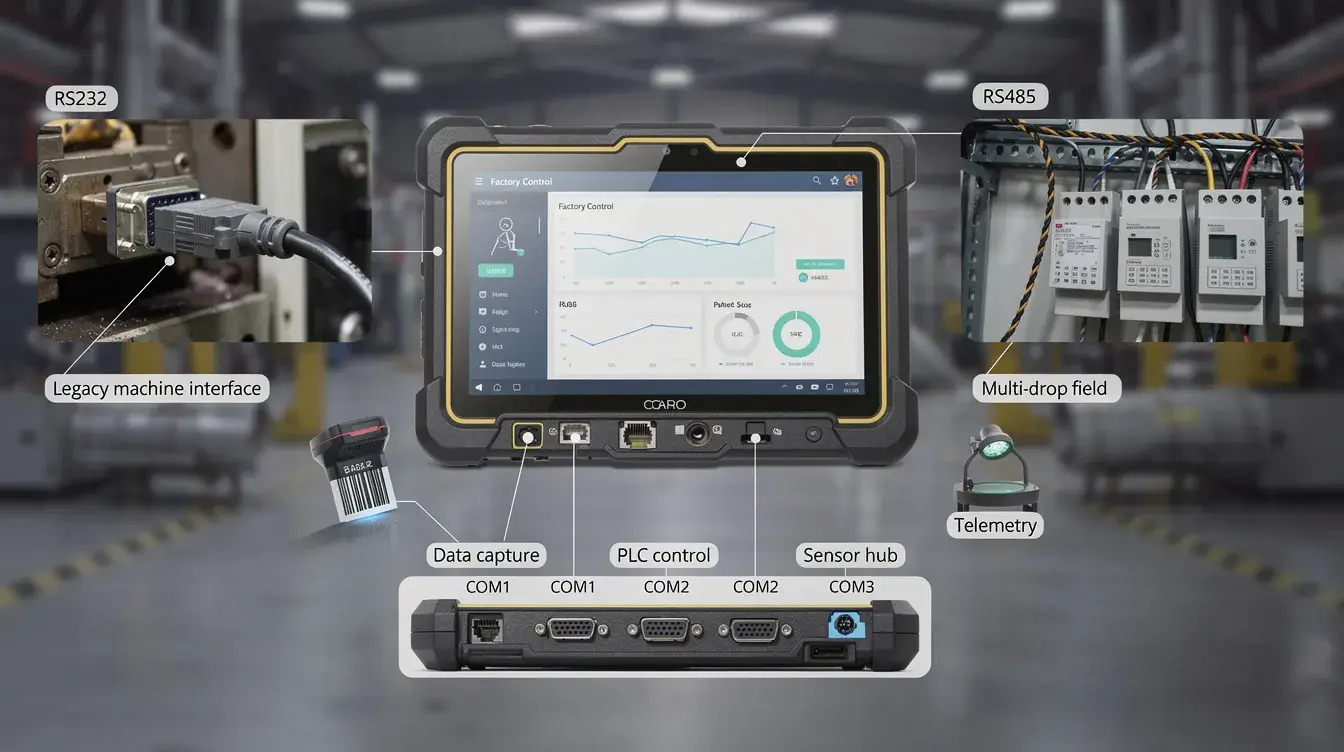
| RS232 / RS485 / USB | Legacy equipment connectivity | Cannot connect printers, scanners, meters, PLC gateways | Validate drivers and cable strain relief |
| Docking station | Charging, mounting, and peripheral expansion | Messy cabling, broken ports, poor workstation stability | Test dock alignment and connector durability |
| Vehicle mount | Secure installation in vehicles or forklifts | Vibration failure, unsafe placement, and charging issues | Verify mounting pattern, lock, and power design |
| OS lifecycle | Security and support status | Compliance risk and future maintenance burden | Confirm edition, update path, and vendor support |
Durability standards for rugged Windows 10 tablets include IP65 to IP68 ratings for dust and water resistance, indicating capability for total submersion in water. Buyers should look for at least IP65 for dust and water jet protection, and IP67 for full submersion. This matrix is more useful than a simple product comparison because it connects hardware choices to operational consequences.
10-Inch, Mini, or Vehicle-Mounted: Choose the Form Factor by Workflow
The phrase “rugged mini tablet” appears in many keyword sets because some buyers want a smaller, lighter device. But smaller is not automatically better in industrial environments.
A 7-inch or 8-inch rugged mini tablet is easier to carry, especially for field service, delivery, meter reading, inspection, and mobile task confirmation. It works well when the worker mostly reads short data, scans codes, checks forms, or captures photos. The trade-off is screen space. Windows desktop applications may feel cramped on a smaller display, especially if the interface was designed for a laptop or monitor.
A 10-inch rugged Windows tablet is often the best fit for most people, offering a balanced choice for industrial work. It provides enough screen area for work orders, dashboards, maps, maintenance software, PDF manuals, inspection forms, and split-window tasks. It is still portable enough for handheld use, but can also be docked at a workstation or mounted in a vehicle.
A larger 11-inch, 12-inch, or 15-inch rugged tablet is useful when workers need detailed drawings, GIS maps, dashboards, or multi-window software. The trade-off is weight, mounting complexity, and handheld fatigue. High-end tablets in these larger sizes may offer advanced features and superior performance, but such premium options are often more than most people require for typical industrial tasks.
A vehicle-mounted rugged tablet should be selected differently from a handheld tablet. For forklifts, trucks, buses, waste management vehicles, or industrial mobile equipment, buyers should focus on vibration resistance, secure docking, wide-voltage power, external antenna options, ignition sensing, CANbus or serial integration, and mounting compatibility.
For KCOSIT-style industrial deployments, the safest approach is to define the device role first, aligning with how rugged tablet industry solutions are tailored to specific applications:
- Handheld inspection device
- Forklift-mounted warehouse terminal
- Vehicle-mounted dispatch terminal
- Factory-side Windows workstation
- Field service diagnostic computer
- Docked tablet for office and mobile use
The right size follows the role, and different rugged Windows 10 tablets can be compared based on their specifications and suitability for each application.
Ports, Docking, and Legacy Equipment: The Real Reason Windows Still Matters
Many buyers choose a rugged Windows tablet not because of the operating system alone, but because the project requires traditional PC-style connectivity.
In industrial sites, the tablet may need to connect to a label printer, LAN network, barcode scanner, USB measurement device, RS232 serial tool, CANbus gateway, external keyboard, camera system, or docking station. Consumer tablets usually depend on adapters. In a controlled office, that may be acceptable. In a factory, warehouse, or vehicle, loose adapters become failure points.
Built-in ports and industrial docking stations reduce support burden. A dock can provide charging, LAN, USB, HDMI, serial ports, USB-C for fast charging and data transfer, and secure mounting through one stable connection. This matters in multi-shift operations, where workers should not have to plug and unplug several cables every day.
For example, a production line workstation may need a rugged Windows tablet with an RJ45 LAN port, a USB keyboard, a barcode scanner, and a label printer. A field service team may need USB diagnostic tools and secure charging inside a vehicle. A forklift-mounted WMS terminal may need stable power, external antenna options, and reliable mounting.
Brands like Dell are well-known for their rugged Windows tablets, offering strong docking and connectivity features that support demanding professional environments.
A Windows tablet with poor docking support can become expensive even if the unit price is low. Broken connectors, unstable adapters, weak mounting, and inconsistent charging create hidden maintenance costs.
For B2B buyers, docking and I/O should be part of the first discussion, not an accessory decision after the tablet is purchased.
Ruggedization Is Not the Same as “Indestructible Tablets”
Some users search for “indestructible tablets,” but no industrial tablet is truly indestructible. Ruggedization means the device is engineered and tested for defined environmental stresses. It does not mean the tablet can survive unlimited drops, pressure, water exposure, vehicle abuse, or incorrect charging.
This is the first major myth.
**Myth: A rugged tablet cannot break. ** Reality: A rugged tablet is designed to withstand extreme conditions and reduce failure risk under specific stresses such as dust, water jets, temporary immersion, vibration, shock, temperature changes, and drops. Buyers still need to check the exact IP rating, test method, drop height, operating temperature, connector sealing, and accessory design to verify the specific limits.
The second myth is also common.
**Myth: A tough tablet Windows 10 model is automatically suitable for industrial use. ** Reality: A tablet may be physically tough but still unsuitable if it lacks the correct OS edition, drivers, ports, dock, battery runtime, screen brightness, or enterprise support.
For outdoor work, the “best tablet for outdoors” is not simply the tablet with the thickest rubber shell. Outdoor usability depends on sunlight readability, touch performance with gloves or rain, GNSS accuracy, battery behavior in temperature changes, LTE connectivity, and secure carrying or mounting options. For work in extreme conditions, it is important to choose a device tested to withstand such environments.
For factory work, ruggedization also includes serviceability. Can the battery be replaced? Can the charging connector survive daily use? Can the dock be replaced quickly? Can IT reimage the unit? Can spare accessories be standardized across models?
Rugged hardware is a risk control tool. It is not a guarantee against poor deployment design.
Rugged Windows Tablet vs Rugged Android Tablet: The Practical Trade-Off
A common keyword overlap appears between rugged Windows 10 tablets and rugged tablet Android 10-inch searches. This shows that many buyers are not fully committed to one operating system. They are comparing platforms.
When selecting devices, rugged Windows and Android tablets should be compared based on workflow requirements and device features to ensure the best fit for your deployment.
The practical trade-off is clear.
A rugged Windows tablet is better when the project needs Windows desktop software, legacy drivers, file-based workflows, enterprise Windows images, local database tools, industrial configuration software, or traditional PC peripherals.
A rugged Android tablet is often better when the project needs fast mobile data capture, barcode scanning, NFC, UHF RFID, proof of delivery, inspection apps, mobile forms, warehouse picking, asset tracking, or field reporting through cloud-based applications.
| Requirement | Better Fit | Reason |
|---|---|---|
| Legacy Windows software | Rugged Windows tablet | Native compatibility |
| MES / ERP desktop client | Rugged Windows tablet | Supports Windows-based business systems |
| USB diagnostic tools | Rugged Windows tablet | Better driver support |
| Barcode-heavy warehouse picking | Rugged Android tablet or handheld | Faster mobile scanning workflow |
| RFID asset tracking | Rugged Android tablet / UHF RFID device | More mobile data capture options |
| Lightweight field forms | Rugged Android tablet | Easier app deployment |
| Docked workstation | Rugged Windows tablet | Better peripheral and LAN integration |
| Lower support burden for simple apps | Rugged Android tablet | Less Windows patching complexity |
| Vehicle-mounted PC workflow | Rugged Windows or Linux vehicle tablet | Depends on software and integration |
| Outdoor inspection with maps and photos | Either | Choose by app and connectivity needs |
The trade-off is not just software. Windows tablets may offer stronger compatibility, but they often require more IT management. Android tablets may be easier to deploy for mobile workers, but they may not support older industrial tools.
KCOSIT buyers should avoid forcing Windows into an Android-native workflow or forcing Android into a Windows-only software environment. The operating system should reduce friction, not create it.
Rugged Tablet Price: What Makes a Windows Rugged Tablet Cost More
“Rugged tablet price” is a common search because buyers often compare rugged tablets with consumer tablets or refurbished Windows tablets. The price difference can look large, but the upfront device cost is only one part of the procurement decision. Specs and features such as rugged certifications, high-brightness displays, and advanced connectivity contribute to the higher price of rugged tablets.
A rugged Windows tablet may cost more because it includes industrial enclosure design, sealed ports, reinforced corners, higher brightness display, stronger thermal design, enterprise-grade storage, docking connectors, replaceable battery options, cellular/GNSS modules, barcode or RFID modules, MIL-STD testing, IP-rated sealing, and longer accessory support.
The hidden cost comes from failure, downtime, and support complexity. A cheaper tablet may become expensive if it fails during a shift, cannot connect to existing equipment, needs adapters that break, has poor battery runtime, or cannot be standardized across sites.
This is especially important when comparing new industrial tablets with renewed or refurbished rugged tablets for sale. Refurbished units may be useful for short-term replacement, pilot testing, or temporary compatibility needs. But for new deployments, buyers should check battery health, warranty status, OS license, BIOS lock, accessory availability, dock compatibility, spare parts, and long-term supply.
A low-priced rugged Windows 10 tablet may be acceptable for a controlled replacement project. It is risky for a new fleet deployment if the OS, accessories, battery, and support lifecycle are unclear. High-end tablets may offer premium features and advanced specs for professional users who require superior performance and specialized capabilities.
Who Should Not Buy Rugged Windows 10 Tablets
Not every industrial buyer should choose rugged Windows 10 tablets.
You should not standardize on Windows 10 rugged tablets for a new long-term deployment if your IT policy requires fully supported mainstream operating systems and you do not have an approved Windows 10 security plan.
You should not buy Windows 10 tablets only because they are cheaper than newer Windows 11 models. The apparent saving can disappear through security exceptions, driver issues, patch limitations, and future replacement pressure.
You should not choose Windows if your workflow is Android-native. For example, warehouse barcode scanning, retail inventory, mobile proof of delivery, NFC checks, and RFID asset tracking may be better served by rugged Android tablets, rugged handhelds, or UHF RFID devices.
You should not use a rugged mini tablet for Windows desktop software if the application interface requires a large screen. Operators may struggle with small buttons, dense tables, and multi-window layouts.
You should not use a handheld tablet as a vehicle-mounted computer without checking power input, mounting strength, vibration behavior, cable routing, and dock durability.
You should not assume that “rough tablet Windows 10” or “tough tablet Windows 10” means industrial-grade. Ask for IP rating, MIL-STD test scope, operating temperature, OS edition, dock options, and port design.
The wrong device may still work during a demo. The problem appears after 50 units are deployed across real shifts, vehicles, warehouses, or outdoor routes.
Deployment Verification Checklist Before You Place a Bulk Order

Before placing a bulk order for rugged Windows 10 tablets, buyers should run a structured verification process. This is especially important for manufacturing, warehouse, field service, transportation, and utility projects.
Use this checklist before standardizing a model.
Software and OS verification
- Confirm the exact Windows edition, not just “Windows 10.”
- Check whether your application vendor supports that OS version.
- Test the full production software image on the tablet.
- Verify login, VPN, security agent, remote management, and update policy.
- Confirm whether Windows 11 migration is required within the project lifecycle.
- Test boot time, sleep/wake behavior, and recovery process.
Hardware performance verification
- Test CPU, RAM, SSD performance, and other key specs with actual software.
- Review all features, including rugged durability, connectivity, and security options.
- Run the tablet with a real workload, not only idle screen time.
- Check thermal behavior during long operation.
- Confirm camera, scanner, GNSS, LTE, Wi-Fi, Bluetooth, and NFC modules if required.
- Verify rear camera specifications and performance, especially if high-resolution imaging is needed.
- Verify speaker, microphone, and headset needs for field communication.
Rugged and environmental verification
- Check IP rating against actual exposure: dust, rain, splashes, washdown, or immersion.
- Confirm drop resistance and MIL-STD test scope.
- Test screen readability outdoors and under warehouse lighting.
- Test glove touch and wet touch with actual operators.
- Validate operating temperature for cold chain, outdoor work, vehicles, or factory floors.
Ports and docking verification
- Test all required USB devices, serial devices, LAN connections, printers, and scanners.
- Verify docking station alignment and charging reliability.
- Check cable routing and connector strain relief.
- Test vehicle mount vibration if used in forklifts, trucks, or mobile equipment.
- Confirm VESA or mounting compatibility where needed.
Fleet deployment verification
- Confirm model availability and supply continuity.
- Define spare battery, charger, dock, stylus, hand strap, and mount requirements.
- Check warranty terms and RMA process.
- Confirm whether accessories are shared across multiple models.
- Build a pilot deployment before ordering the full fleet.
- Document a replacement path for Windows 11, Android, or newer hardware.
A professional rugged tablet project should include device testing, workflow testing, accessory testing, and support testing. A specification sheet alone is not enough.
How KCOSIT Buyers Can Standardize a Windows Rugged Tablet Project
For KCOSIT-style industrial customers, the best procurement path is to define the project around the workflow first, then select the tablet category.
If the project requires Windows desktop software, machine-side reporting, inspection software, legacy USB tools, LAN-connected equipment, or docked workstations, KCOSIT Rugged Windows Tablets for industrial use are the natural category to evaluate. Consider whether a fully rugged tablet is needed for extreme environments, or if a compact, highly portable model is better suited for users who prioritize ease of transport and field mobility. The key requirements should include screen size, processor, memory, SSD, IP rating, display brightness, docking, LAN, USB, serial port, battery design, and OS edition.
If the project is mostly warehouse scanning, receiving, picking, packing, inventory count, retail stock checks, or asset tracking, KCOSIT Rugged Android Tablets for fieldwork and industrial use, Rugged Handhelds, Barcode Scanner Tablets, or UHF RFID Devices may fit better. These devices can reduce weight and simplify mobile data capture.
If the project is vehicle-based, such as forklift terminals, fleet dispatch, truck routing, cold chain vehicles, or special equipment terminals, KCOSIT vehicle-mounted rugged tablets for fleet management and docking accessories should be considered. The buyer should focus on power stability, mounting safety, vibration, external antennas, LAN, RS232/RS485, CANbus, and wide-voltage support.
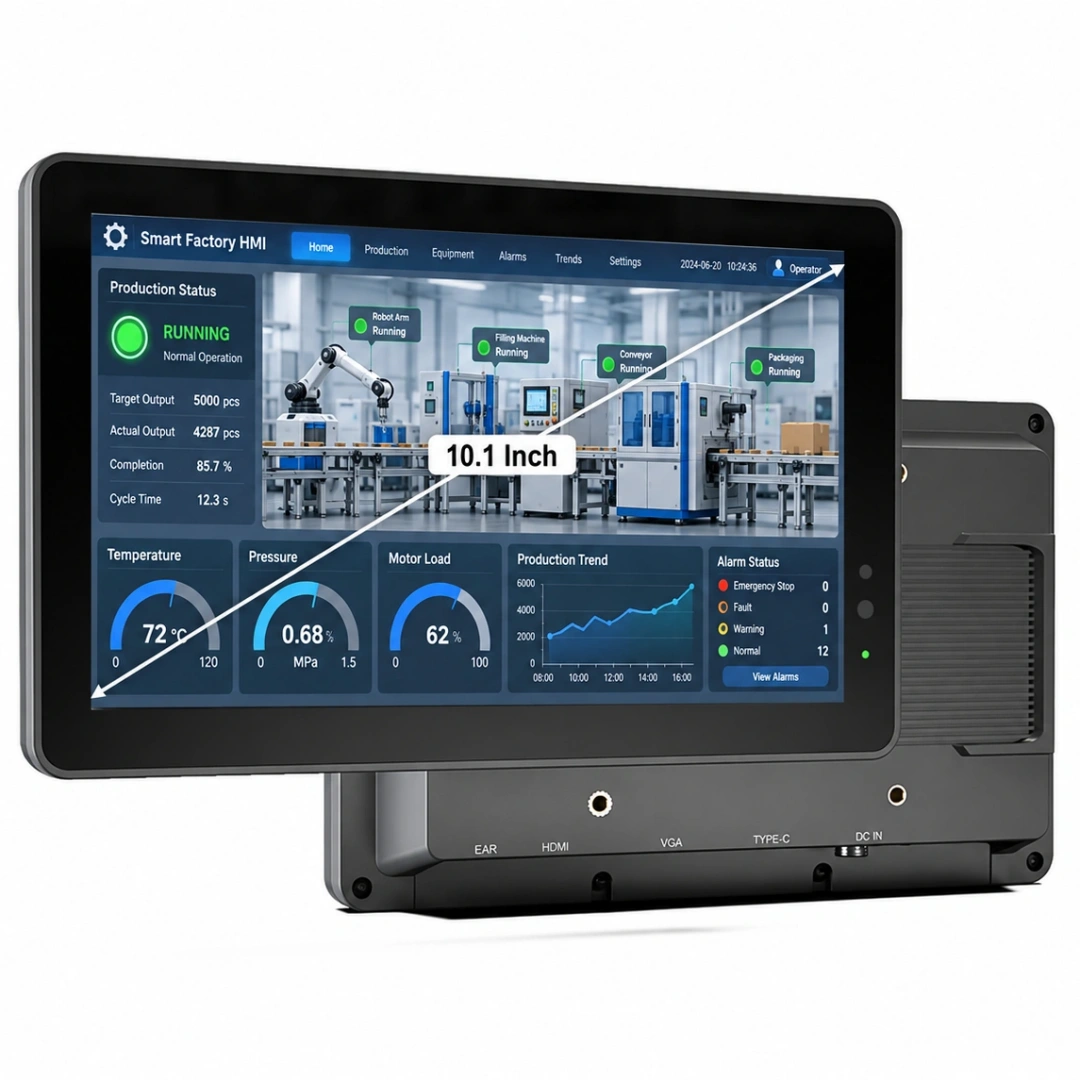
If the project needs a fixed factory screen, production dashboard, or HMI-style terminal, an industrial panel PC from KCOSIT’s rugged device range may be more appropriate than a handheld rugged tablet.
The correct KCOSIT bridge is not “buy one rugged tablet for everything.” The correct bridge is to match KCOSIT rugged tablets and durable industrial devices, rugged Android tablets, vehicle-mounted tablets, handheld devices, and docking accessories to the real deployment role.
Procurement Summary: How to Choose Rugged Windows 10 Tablets Safely
Rugged Windows 10 tablets can still be useful, but they require careful procurement judgment in 2026. The decision should not be based only on price, screen size, or rugged appearance. It is essential to evaluate the features, specs, and rugged certifications—such as MIL-STD-810H, MIL-STD-461G, and IP ratings—offered by each device to ensure it meets your operational requirements and can withstand harsh environments.
Choose a rugged Windows 10 tablet when your project depends on Windows software, legacy drivers, enterprise images, docked workstation use, or industrial peripherals that are difficult to support on Android.
Be cautious if the project is new, long-term, security-sensitive, or not tied to Windows-only software. In that case, Windows 11, Windows IoT Enterprise, a rugged Android tablet, or a purpose-built rugged handheld may be a better long-term choice.
Before placing a bulk order, verify the exact OS edition, lifecycle, application compatibility, docking system, ports, display readability, battery runtime, rugged testing, accessories, and support path.
For industrial buyers, the best rugged tablet is not the one that looks the toughest. It is the one that keeps the workflow stable, connects to the right systems, survives the real environment, and remains supportable across the full deployment lifecycle.